

Lifecycle Client Management
Sovereignty Through Real-Time Control
Manage 500 computers with just one person – complexity becomes simple with highsystem | CLOUD.
The automation of your end devices (clients) must not be a delayed 'black box'. While conventional cloud solutions often act sluggishly, highsystem | CLOUD offers a direct real-time connection to your clients. From initial provisioning with all applications to secure lifecycle management, you maintain full control over your entire client landscape.
Feature
highsystem | CLOUD
Conventional Cloud Solutions
Command Chain
Real-time: Immediate action after click.
Delayed: Long sync cycles.
OS Upgrades
In-place: Change like a 'drawer'.
Sluggish: Often complex workarounds.
Quality Assurance
Test groups: First check, then roll out.
Limited: Less control depth.
Key Functions at a Glance
Operating System & Patch Management: Security Without Business Interruption
Secure operating systems - through targeted validation in pilot groups, you ensure a controlled, time-controlled rollout – for maximum stability without unexpected work interruptions.
Efficient Updates
- ►In-place upgrade: Replacing the 'operating system drawer' while fully preserving all data and settings.
- ►Intelligent patch management: Defined test groups guarantee stability before patches are distributed company-wide.
- ►Central success control: Complete overview of all patch statuses and versions in the Security Center at any time.
Security & Control
- ►Forced or time-controlled installations: Exactly when the user needs it and experiences no work interruption.
Remote Control
Benefit from fast and barrier-free remote access with our in-house developed remote control software.
Barrier-Free Access
►Barrier-free access: Direct remote access through intelligent integration of our own Remote Control software.
Secure Remote Access
►Secure remote access: Problem solving via remote control – data protection compliant through mandatory user opt-in.
Software Deployment & Management
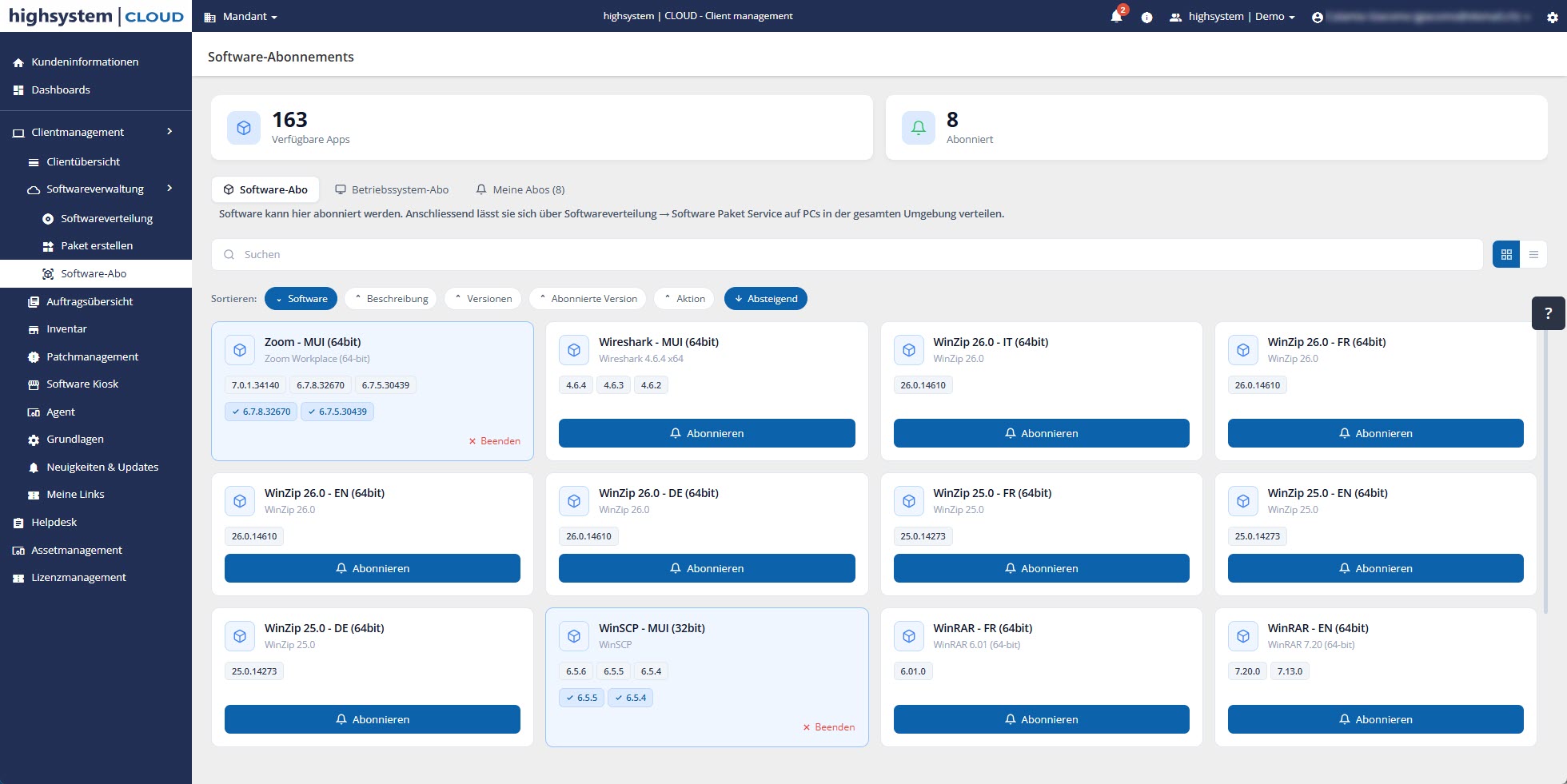
Optimize your software distribution together with our intelligent Package Builder – powerful in function, intuitive in application.
Software Distribution & Kiosk
- ►Intuitive distribution: Software installation via drag-and-drop, executable anytime and by anyone.
- ►Self-service kiosk: Your users install approved software independently and securely. E.g., after training on a new SAP version.
Package Builder & Diagnosis
- ►Package Builder: We support various packaging methods to guarantee reliable software distribution for every scenario.
Option: Always up-to-date with highsystem | CLOUD Package Service
Benefit from massive relief for your IT department through our proactive package service. Instead of laboriously packaging standard software or new OS versions yourself, access a library of over 100+ predefined, installation-ready software & OS packages.
- ►Immediate readiness: Download current versions directly from highsystem ag, test them in your environment and release them for automated rollout.
- ►Current examples: Always receive the latest versions of common applications like Java, Adobe Acrobat Reader, web browsers or common utility tools.
- ►Security through control: We actively inform you about new versions. To maintain full control over your environment, the automatic update function of the software within the packages is disabled by default – you decide on the timing of distribution.
- ►Compliance & Protection: Close critical security gaps immediately after a patch appears and minimize the risk of cyber attacks.
User Portal & Self-Service
Create a modern, barrier-free interface between IT and users for faster provision of software and services.
Central IT Interface
►Barrier-free access: The portal enables your users quick and easy access to IT services.
Self-Service Kiosk
►Time savings: Employees install needed software independently. IT saves valuable time on routine tasks.
Diagnosis & Security Center
Maintain full control over your IT infrastructure through complete transparency and proactive real-time security monitoring.
Diagnosis & Security Center
- ►Diagnosis & Support: Analyze PC and server problems chronologically and data-driven with immediate action needs.
- ►Software inventory: Automatic software inventory after each installation for current transparency.
Hardware & Software Inventory
Central Security: Monitor important firewall, antivirus and device security settings globally across the entire company. Time-controlled inventories ensure continuous accuracy of hardware and software inventory, even in distributed networks.
Strategic Management
Optimize your IT processes through intelligent automation and maintain full control over your OS and software distribution at all times with powerful features, even in distributed networks.
Extended Software Logic
- ►Flexible distribution: Real-time installation or time-controlled rollout via drag-and-drop.
Central Interfaces
- ►Central IT interface: Barrier-free access for users to all IT services.
- ►Self-Service Kiosk: IT relief through employee independence.
You no longer manage devices, you control processes in real-time.
Software Deployment
Security & Patching
Remote & Diagnosis
- ►Drag-and-drop assignment
- ►Automated, unattended rollouts
- ►Self-service kiosk for users
- ►Software package service with 100+ applications.
- ►Central dashboard
- ►Forced updates for critical gaps.
- ►One-click remote access (with user opt-in)
- ►Chronological error analysis
- ►Sustainable problem resolution.
Ready for the Next Step?
Discover in our free demo how highsystem | CLOUD revolutionizes your client management.
Frequently Asked Questions
- What does client management include?
- Endpoint management, software deployment, patch management, OS deployment and remote control – controlled centrally from the Swiss cloud.
- Which operating systems are supported?
- Client management handles Windows clients and servers and covers software deployment, updates and operating-system rollouts.
- How does software deployment work?
- Software and updates are packaged centrally and rolled out automatically to defined devices or groups – without manual effort on site.
We use cookies to provide you with the best experience on our website. If you continue to use this site, we assume you agree. Privacy Policy